AX
Capture, record and edit — all in one place
Capture, record, cut —
and export in one go
Five small tools, one toolbar.
Stop recording and the editor is already open.

Capture it, mark it up, change it later
Annotate screenshots and saved images right where they are.
Annotations stay editable after you save
Double-click a photo, add arrows, circles and text, then save. Open it again and every annotation is still there to move or change.
- Arrows, text, shapes, highlighter
- Blur or pixelate to hide details
- Works on screenshots and downloaded images
Folders, like File Explorer
Open and close folders in the tree on the left to browse. Filter by name and resize thumbnails on the fly.
Ctrl+PrtSc from anywhere
Drag over a video while it plays and the shot lands on your board.
Infinite canvas board
Spread your captures out on one board and arrange them by dragging. Zoom in and out freely.

Stop recording, start editing
No waiting for a render. The editor opens the moment you stop, and trimmed cuts save in seconds.
F8 to record, F9 to stop — then straight to editing
When you stop, the Video Editor opens your recording. Cut it and save with Ctrl+E — one smooth flow.
- Region, window or full screen
- Light on CPU with GPU encoding
- Editor opens automatically when you stop
Cut and saved in under 2 seconds
Fast Save re-encodes only around your cuts and copies the rest untouched. No progress bar to wait for.
Measured in Windows Sandbox (no graphics card) · two cuts right after recording, then Fast Save · the timer in the video shows the real time taken.
Pick the recording area
Drag the frame corners to fit, or switch to full screen or a single window.
Hotkeys over any app
Watching something in the Player? Just press F8 and F9 — AX doesn't need to be in front.

Keep the parts you need, export right away
An editor built for quick cuts. Split, move, caption and save.
Cut, close the gap, done
Split at the playhead with Ctrl+B, then Shift+Delete a piece and the rest slides up.
- Split, move and join clips
- Frame-accurate
- Your recording opens here automatically
Captions and timecode
Add a caption and drag it into place on the video. Timecode with one button.
Crop to an area
Drag over the part you want and get a new video with just that area.
Fast Save
Re-encodes only around your cuts — even long recordings save in seconds.

A light, fast player
Plays the moment it opens — and the only AX tool you can open many times side by side.
Hover the bar to preview
Move along the seek bar and the frame at that spot pops up instantly. Click to jump there.
- Playlists and A–B (I · O) loop
- Subtitles and loudness levelling
- ← → to skip, wheel for volume
Many windows at once
Open several references next to each other and watch them together.
Audio as a waveform
Audio files such as WAV show a per-channel waveform instead of a blank screen.

Collect references, browse as they arrive
Grab a batch of videos and flip through them while they download.
Change the view while it downloads
Paste a batch of links and, while they download, switch between tiles, list and columns or resize thumbnails instantly.
- Paste many links into one download queue
- Send the page you're on from the Chrome extension
- Downloads show up in the Video Editor right away
Star ratings and column picker
Click a star to rate on the spot, and use the funnel to show or hide columns like date, size and codec.
Play on hover
Turn on rollover playback and only the card under your mouse moves. Stays light with hundreds of clips.
Double-click to open in the Player
Double-click a download to watch it big in the Player.
Download → cut → save fast
One toolbar ties the five tools together. Edit what you just downloaded.
Trim a download and save
When the download finishes, the scissors icon at the top opens the Video Editor. Your new clip is in the AXD folder — drag it in, cut and save.
Drag a web image in and mark it up
Drop an image from your browser onto an Image Capture folder to save it, then double-click to annotate.
Five tools, one toolbar
Each opens and closes on its own. Call any other tool from the icons at the top.
The AX tools are currently in Korean. The videos show the Korean interface.
How to install
One time only. No admin rights, about 2–3 minutes.
Yellow boxes show where to click. Screenshots are from Korean Windows; button names are given in English.
Click Download
Click Download at the top of this page to get the installer (AXTools-win-Setup.exe, about 265 MB). It takes a minute or two depending on your connection.

Open the downloaded file
Pick your browser — the screens differ a little.
For a program it hasn't seen often, Edge shows "isn't commonly downloaded" and holds the file. It doesn't mean anything is wrong with it — just that few people have downloaded it yet. Release it like this:
When the download finishes, the downloads panel opens at the top right with a warning. If it closed, click the download icon with ⚠ next to the address bar.
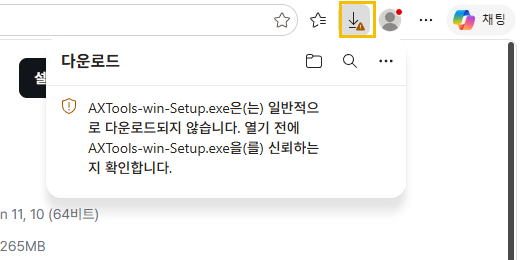
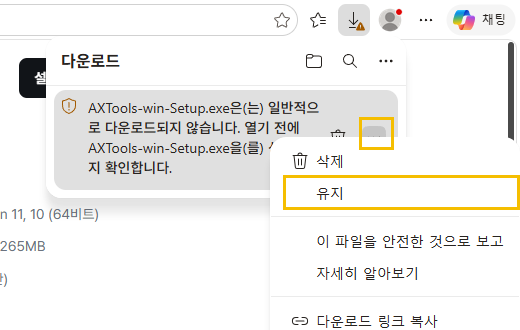
Hover the warning and a ⋯ appears on the right. Click it and choose Keep.
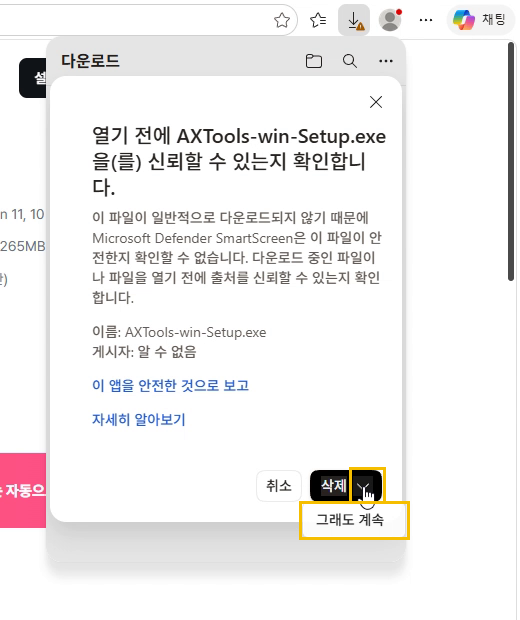
A confirmation opens. Don't click Delete — click the small ∨ next to it, then Keep anyway.
Once the name changes to
AXTools-win-Setup.exe, click Open file.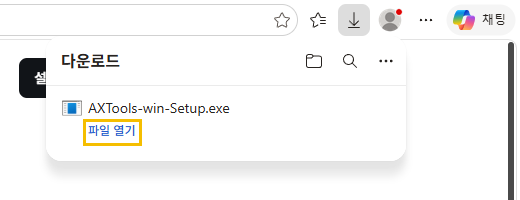
When the download finishes, the downloads panel opens at the top right. Click AXTools-win-Setup.exe to run it. If it closed, click the download icon (↓) next to the address bar.
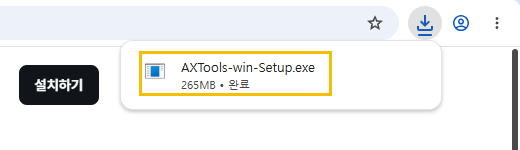
If Chrome holds the file with a warning, use that item's ⋯ (or the button on the right) to choose Keep, then click it again.
If a blue "Windows protected your PC" window appears
AX is made by an individual, so Windows asks once. Click More info, then Run anyway.
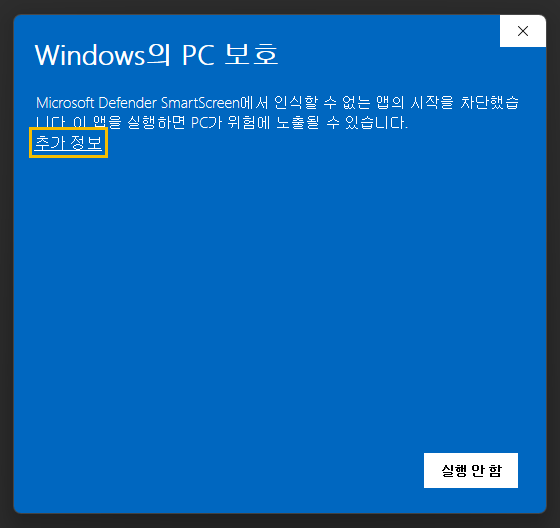
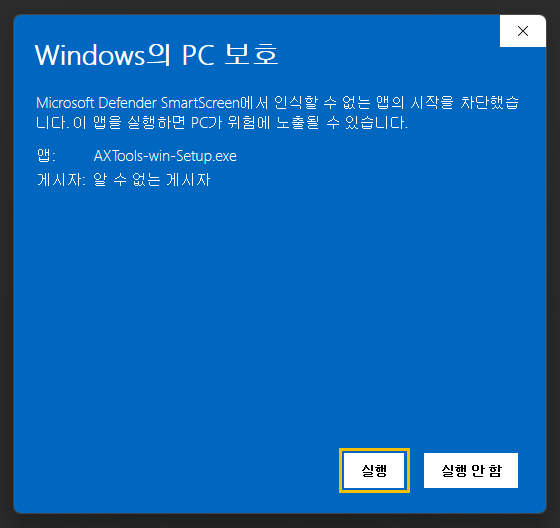
If you chose "Keep anyway" in Edge, this window may not appear. If it doesn't, just move on.
Wait a few seconds
An "Installing AX" window flashes up and closes, and the AX Video Editor (AXE) opens by itself. Nothing else to click.
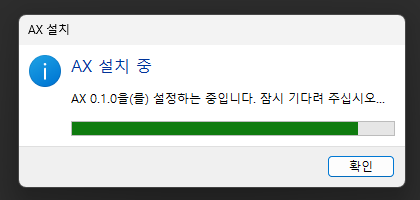
Done — five tools on your desktop
Shortcuts for Reference Downloader · Image Capture · Screen Recorder · Video Editor · Player appear on the desktop and in the AX folder of the Start menu. Use them from now on.
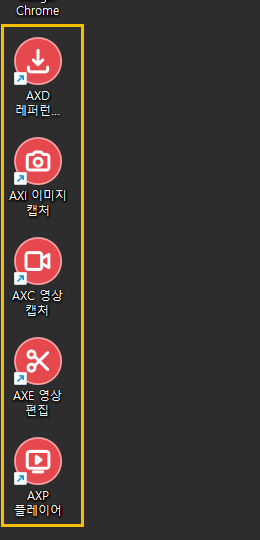
When a new version comes out, the tools tell you as they start. No need to reinstall.
FAQ
Anything else? Let us know.
How do updates work?
Nothing to do. When you open a tool it fetches the new version in the background and asks "Update when closing?". Say yes and it switches when you close that tool.
My download is stuck as "Unconfirmed ….crdownload"
It finished, and Edge is holding it. In the downloads panel choose ⋯ → Keep, then ∨ next to Delete → Keep anyway, and it becomes AXTools-win-Setup.exe. See step 2 of the install guide.
Why the warnings? Is it safe?
AX is made by an individual and isn't yet on Microsoft's list of commonly downloaded programs, so the browser and Windows check with you once. Only use the file from this page's Download button.
Where are recordings and captures saved?
Videos go to AX in your Videos folder, images to AX in Pictures. You can change this in settings.
Does it keep running in the background?
No. Close the window and that tool quits completely. Nothing in the tray, nothing at startup.
How do I uninstall?
Open Windows Settings → Apps → Installed apps, find AX and uninstall. The shortcuts go too.
Licenses
AX is a free preview. It ships with FFmpeg, mpv and yt-dlp; their license texts are in the licenses folder of the install.